Well logs that load the first time.
With a record of every change.
PetroCurve checks LAS, DLIS and LIS files for the problems that stop an import or quietly put wrong numbers in a model. Fix what can be fixed in one click, keep what you choose, and export LAS 2.0 with a QC report. Your files never leave your browser.
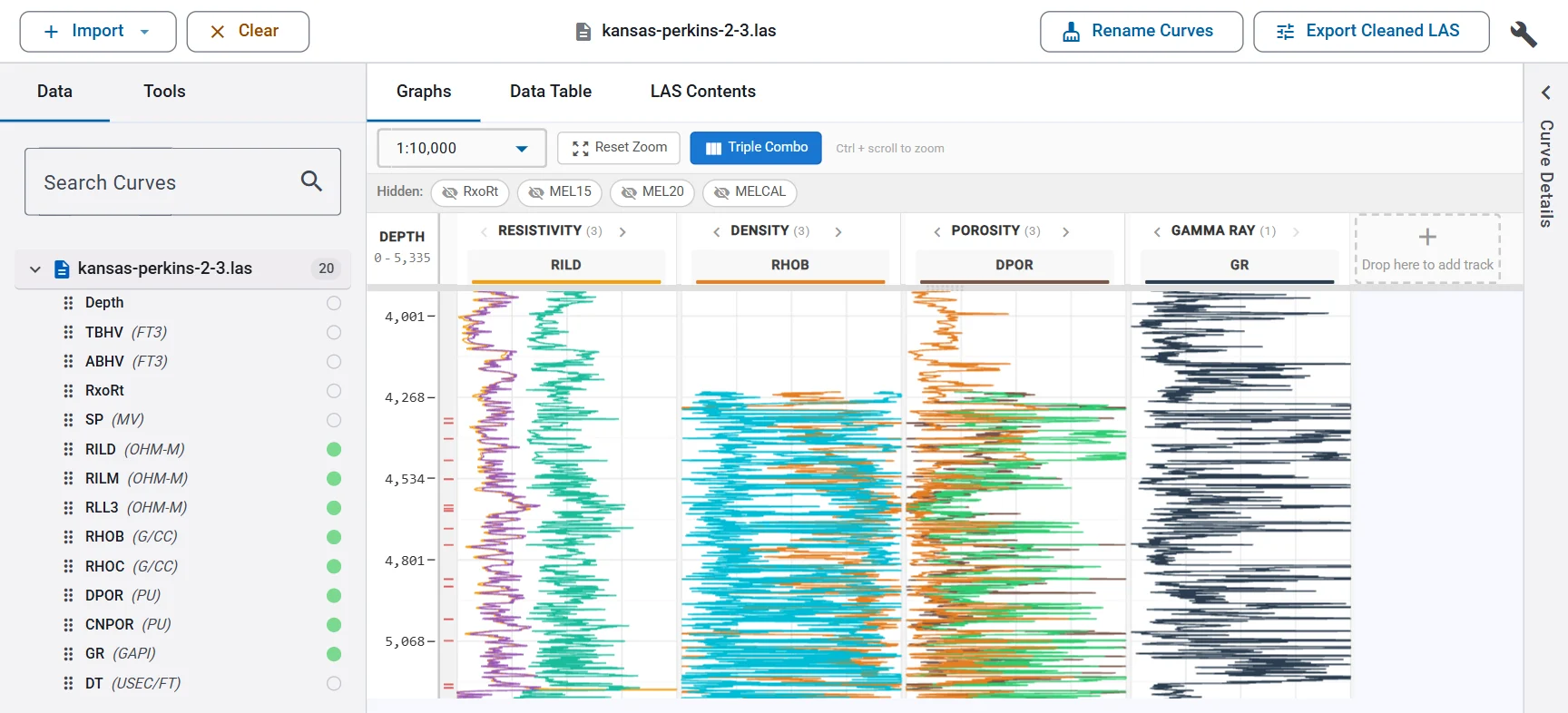 Open the demo and run Review data on a sample well log
What PetroCurve checks
Five steps, worst problems first, each one explained in plain words
- Depth indexDepths out of order or repeated, a start off its own step, units that contradict the name, time logs under a depth name, and logs that run bottom-up.
- Depth referenceA KB, DF or GL elevation and a datum that are present and plausible, and feet against metres between the header and the data.
- ValuesCurves with no data, nulls that are not the file's NULL, dashes and text in the data, impossible values, factor-of-1000 unit errors, and readings smeared into gaps.
- Curve namesNames used twice, which Leapfrog Geo refuses to import, vendor names matched to standard ones, and units that contradict the curve's name.
- Source fileDamaged bytes in a DLIS or LIS file, and everything a conversion to LAS cannot carry.
Every review ends with two answers: is the file ready for LAS 2.0 and Leapfrog Geo, and is it ready for a strict LAS 2.0 check such as LAS Certify? When it is not, you get the reasons.
How it works
From the file you were sent to a file you can load, in minutes
- OpenA LAS, DLIS or LIS file, read in your browser. Nothing is installed or uploaded.
- ReviewReview data walks through the five checks and says why each problem matters.
- Fix or keepApply a fix in one click, or keep the data as it is with a note. Reset undoes everything.
- ExportLAS 2.0 with a QC report of every decision, and for DLIS or LIS a receipt of what did not fit.
Everything you need for LAS, DLIS and LIS data
Check it, name it consistently, and look up what any curve measures
Check a Well Log
Run Review data on any file: depth, datum, values and names, with one-click fixes and a readiness verdict for Leapfrog Geo and LAS Certify.
Standardize Curve Names
Match vendor mnemonics to industry-standard names. Renames change the name only, never the units or the values, and each one is recorded.
Search the Curve Catalog
Look up what a curve measures, which tool recorded it and which service company names it that way.
Open DLIS and LIS files. Convert them to LAS.
The binary well log formats almost no free tool can read now open in your browser. See what is inside, plot it, and get a LAS 2.0 file with a receipt of everything that did not fit.
Free. Read on your device, never uploaded. Wireline DLIS (RP66 V1) and LIS-79/84, tape-image files included.
- See everything insideThe well header, every log data set, every curve with its tool, units, range and a preview, plus the parameters and the field remarks.
- Know what to watch forDamaged or cut-short files, depth indexes off their grid, time logs under a depth name, curves that hold no data, and implausible elevations, flagged before you use the data.
- Plot it in one clickOpen any log data set in the PetroCurve viewer, the same multi-track display you use for LAS.
- Convert to LAS, with a receiptA LAS 2.0 file plus a record of every channel, frame and object that could not go in, and every change made on the way.
Why We Built PetroCurve
Most well log problems do not stop a file from opening. They surface later: a log tied to the wrong datum, a null plotted as a reading, a model that will not import a file with two curves called GR. The person who receives the file is usually the last one who can catch them, and the tools they have either cannot open the file or change it without saying what they did.
PetroCurve shows those problems in minutes, fixes the ones that can be fixed, and writes down every decision, so the next person can see what was done and why. It is built for geothermal, mining, survey and consulting teams who receive DLIS, LIS and LAS files from logging contractors and need them in Leapfrog Geo, WellCAD, Petrel or Python.
What Are LAS Files and Why Standardize Curve Mnemonics?
LAS (Log ASCII Standard) files are the most widely used format for exchanging well log data in the oil and gas industry. Each LAS file contains measurements recorded by downhole logging tools — such as gamma ray, resistivity, neutron porosity, and bulk density — stored as columns of data identified by short codes called curve mnemonics.
The challenge is that curve mnemonics vary widely between service companies, vintages, and regions. A gamma ray curve might appear as GR, GAM, SGR, or dozens of other abbreviations depending on who acquired the data. This inconsistency makes it difficult to merge datasets, automate petrophysical analysis workflows, or build reliable machine-learning models from well log data.
Standardizing curve mnemonics — mapping them to a recognized naming convention like the PWLS (Practical Well Log Standard) — solves this problem. With consistent names, you can programmatically identify curves across thousands of LAS files, apply batch processing, and ensure your petrophysical analysis is comparing like with like.
PetroCurve suggests a standard name for each curve it recognizes, checks that the curve's units agree with it, and records every rename in the QC report. Drop your file, review the suggestions with the rest of the checks, and export a clean LAS 2.0 file, all without uploading your data to a server.
Popular Well Log Curves
Browse commonly used well log curve mnemonics
What's New
Latest updates from the PetroCurve team